The Clear Use feature is useful if you want to clear a person’s usage for a specific file, print activity, device, other limit as defined in your DRM Policy for that user. The written instructions are below but if you prefer to watch a video, click here to skip down to our Video Tutorial.
 Important Note:
It is only recommended to clear a person’s use if you DO NOT suspect fraud or malicious use of any kind. The DRM limits you impose are there to prevent unauthorized sharing, so you need to be very sure of taking this action. However, sometimes a legitimate user reaches their limit, especially if they lost their device, use incognito mode to view content, or recently got a new computer.
To clear a person’s use:
1. In your Vitrium Security account, navigate to the USERS tab
2. Click the CLEAR USE icon beside the user in question:
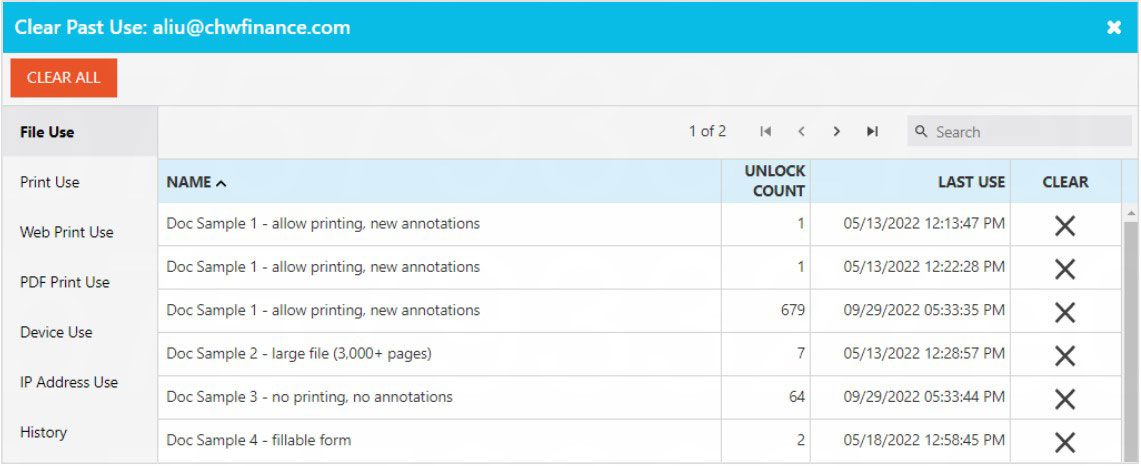
3. In the pop-up window that appears next, you can click the ‘X‘ under the CLEAR column beside the file in question. You can also choose to clear use for a specific print activity (in Print Use), a specific device (in Device Use), or a specific IP address (in IP Address Use). You can also click CLEAR ALL to reset all the limits.
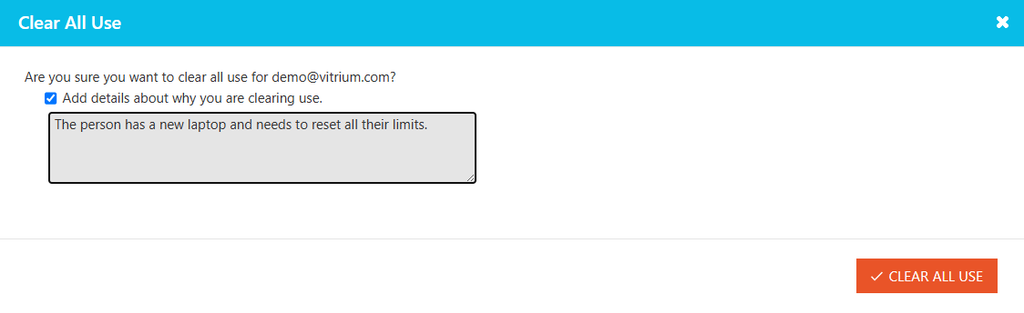
4. Before clicking the CLEAR button, we strongly recommend you add a reason why you are clearing the use by checking the “Add details…” box and enter the relevant information here.
Video Tutorial
Alternatively, you can watch this video to learn how to clear use: