


Skip ahead to one of these sections to learn more:
What is a Staff User
Staff Users are the Vitrium administrators who can log into Vitrium Security and perform various admin functions such as:
- Adding content and creating folders
- Adding users & groups (unless this is managed in your other system)
- Assigning permissions to content (unless this is managed in the External Service code)
- Managing account settings, content settings, watermarks, DRM settings, and more
- Viewing user activity & analytics reports
Adding a New Staff User
To add a new Staff User:
- In Vitrium, go to SETTINGS
- Click Staff Users
- Click ADD STAFF
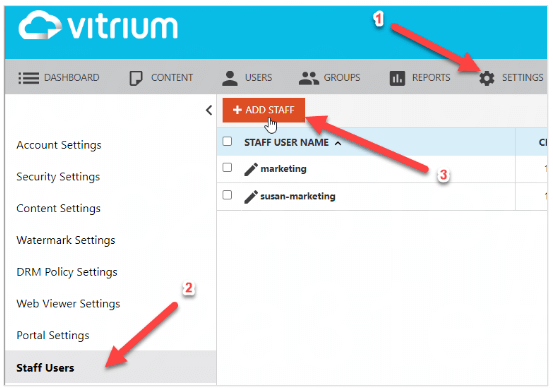
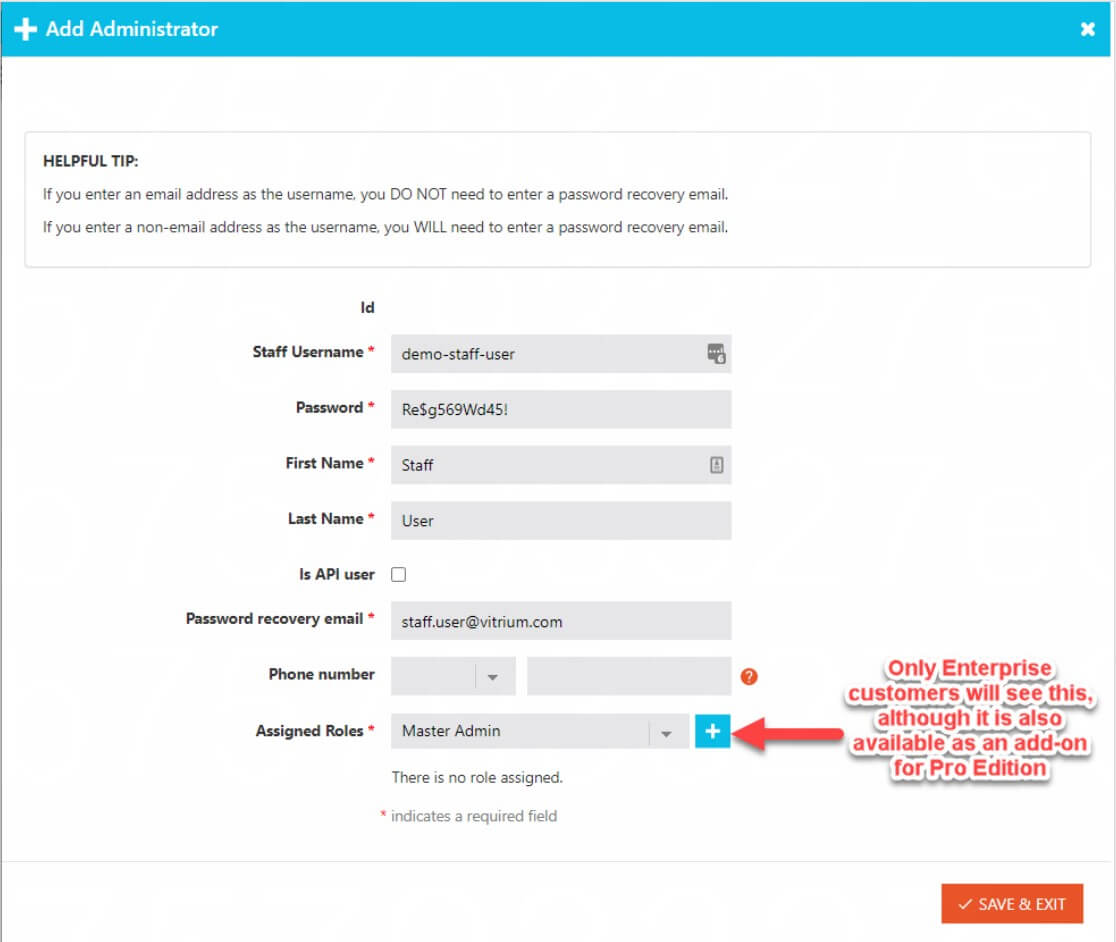
- Enter the following information on the ‘Add Administrator’ screen, then click SAVE & EXIT (for Enterprise accounts, you need to ensure you assign a Staff Role by clicking the + symbol)
A Staff User can also be an End User, but you would need to add them separately as an end user in the Users tab.
Overview of Staff Roles
| Function | Master Admin | Content Manager | Permission Manager | Support Role | System Viewer |
|---|---|---|---|---|---|
| View & Search Content | x | x | x | x | x |
| Edit Content | x | x | |||
| Deactivate or Delete Content | x | x | |||
| Assign Content or Folder Permissions | x | x | |||
| Decode Content | x | x | x | ||
| Add, Edit, Import, or Export Users & Groups | x | x | |||
| View & Search Users or Groups | x | x | x | x | |
| Add Users to Groups | x | x | |||
| Deactivate or Delete Users & Groups | x | x | |||
| Clear Use for Users | x | x | x | ||
| View all Settings & Edit My Profile | x | x | x | x | x |
| Add or Edit Support URL, Time Zone & Date Format | x | ||||
| Add or Edit Content Settings & Watermark Settings | x | x | |||
| Add or Edit DRM Policy Settings | x | x | |||
| Add or Edit Web Viewer, Login Page & Portal Settings | x | ||||
| Add or Edit Staff Users | x | ||||
| Add or Edit SSO & Integration Settings | x | ||||
| Add or Edit Security & SMTP Settings | x | ||||
| View Dashboard & Reports | x | x | x | x | x |
| Export Reports | x | x | |||
| Make API Calls | x |
Video Tutorial
Watch this video to learn more about how to add Staff Users and what all the Staff Roles mean: