Staff Users are the Vitrium administrators who can log into Vitrium and perform various admin functions such as:
- Adding content, users & groups
- Assigning permissions to content
- Managing settings
- Viewing user activity & analytics reports
To add a new Staff User:
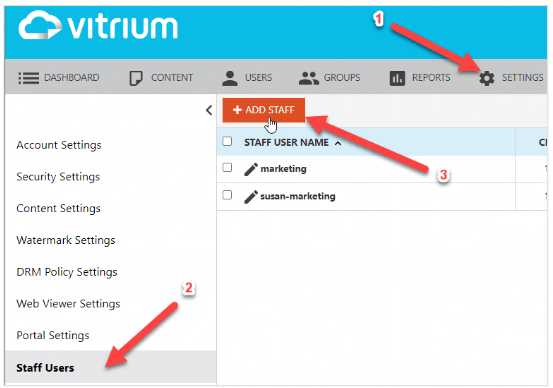
- In Vitrium, go to SETTINGS
- Click Staff Users
- Click ADD STAFF
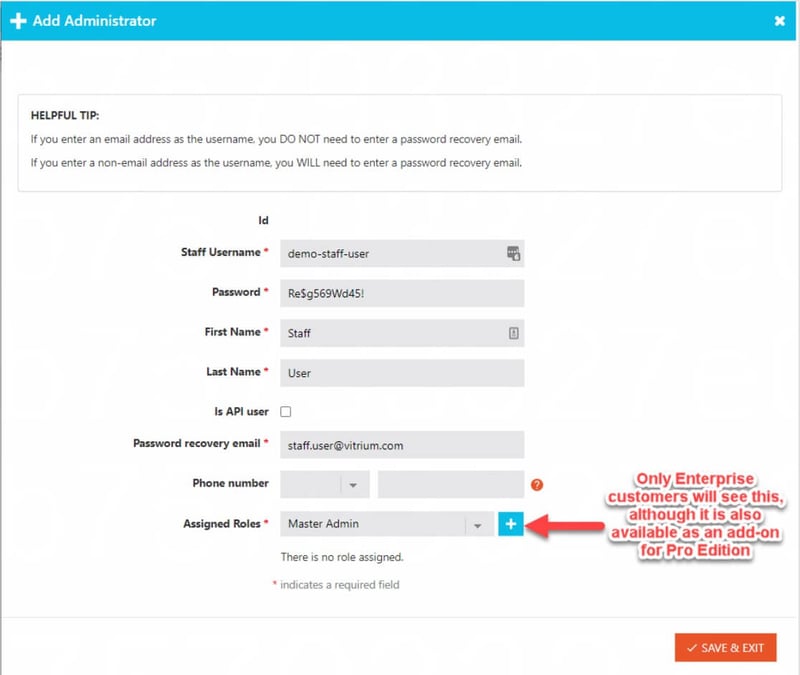
- Enter the following information on the 'Add Administrator' screen, then click SAVE & EXIT (for Enterprise accounts, you need to ensure you assign a Staff Role by clicking the + symbol)
A Staff User can also be an End User, but you would need to add them separately as an end user in the Users tab.
Overview of Staff Roles
| Content / Folders | Master Admin |
Support Role |
Permission Manager |
Content Manager |
System Viewer |
| View & Search Content | x | x | x | x | x |
| Edit Content | x | x | |||
| Activate, Deactivate or Delete Content | x | x | |||
| Assign Content Permissions | x | x | |||
| Ability to Decode Content | x | x | x |
| Users & Groups | Master Admin |
Support Role |
Permission Manager |
Content Manager |
System Viewer |
| Add, Edit, Import & Export Users & Groups | x | x | |||
| View and Search Users & Groups | x | x | x | x | |
| Add or Remove Users to Groups | x | x | |||
| Activate, Deactivate or Delete Users & Groups | x | x | |||
| Clear Use for User | x | x | x |
| Settings | Master Admin |
Support Role |
Permission Manager |
Content Manager |
System Viewer |
| View All Settings & Edit My Profile | x | x | x | x | x |
| Add or Edit Support URL, Time Zone & Date Format | x | ||||
| Add or Edit Content Settings & Watermark Settings | x | x | |||
| Add or Edit DRM Policy Settings | x | x | |||
| Add or Edit Web Viewer & Portal Settings | x | ||||
| Add or Edit Staff Users | x | ||||
| Add or Edit SSO Settings & External Services | x | ||||
| Add or Edit Security Settings & SMTP Settings | x |
| Dashboard / Reports | Master Admin |
Support Role |
Permission Manager |
Content Manager |
System Viewer |
| View Dashboard & Reports | x | x | x | x | x |
| Export Reports | x | x |
| API / Integration | Master Admin |
Support Role |
Permission Manager |
Content Manager |
System Viewer |
| Make API Calls | x |