Learn about two different unlock reports in Vitrium that can provide you better insights for your company.
|
|
Successful Unlocks
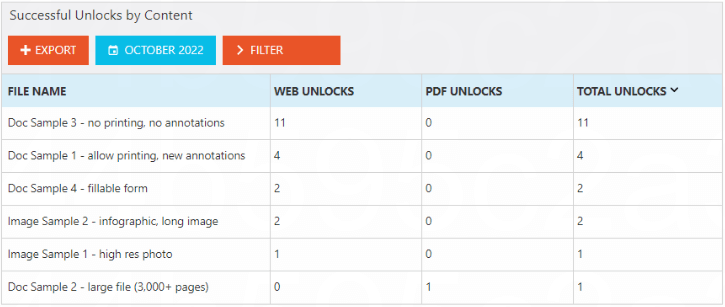
This report shows the number of times each content has been unlocked or viewed by end users. If you distribute both the secure web viewer and protected PDF, this report will show you counts for both types, including the TOTAL UNLOCKS:
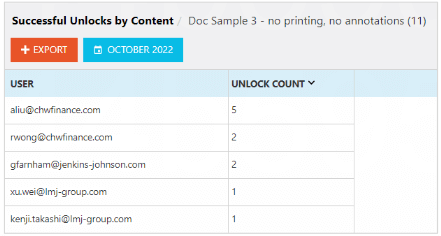
You can click on a specific content to drill down further to see which users accessed the content and how many times each:
Failed Unlocks
This report shows which users are having the most ‘difficulty’ in accessing your protected content, either because they keep exceeding the DRM limits you impose on them, or they keep forgetting their password.
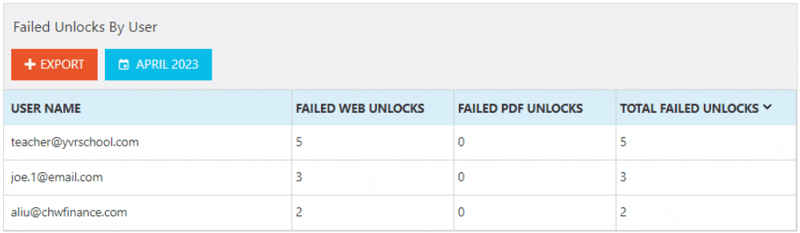
You may also want to look up these users in the User Activity Log to see what error code appears:

If the error code relates to DRM limits continuously exceeding, you should consider these options:
- Revoke the user’s access altogether if you suspect malicious use.
- Clear their use if you believe they are legitimately trying to access your content in good faith.
- Consider increasing your DRM limit for that user (or all users if many of them are receiving the ‘vc3’ error)