The CONTENT tab is the primary place where you will upload and manage your content. Vitrium converts uploaded files into encrypted formats that cannot be edited.
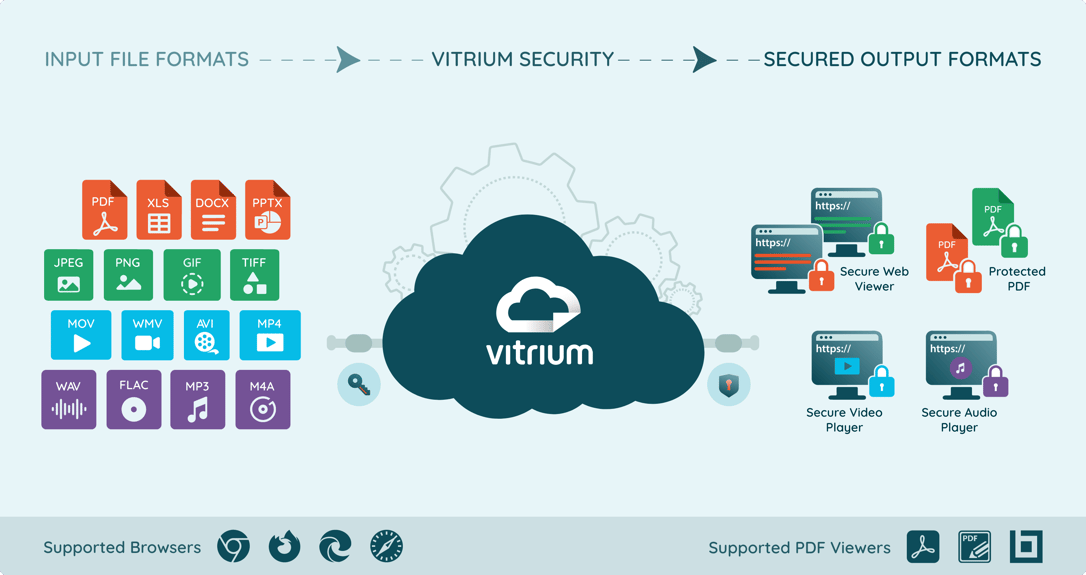
Vitrium supports over 25 different file inputs but only has 4 different encrypted formats, depending on what type of content is being uploaded. To learn more, click on these sections:
Supported File Formats
The following are the supported file formats in Vitrium:
| Input Formats | Encrypted Formats |
DocumentsPDF |
Secure Web Viewer Protected PDF File |
ImagesJPGPNG BMP TIFF GIF (except animated GIFs) |
Secure Web Viewer Protected PDF File |
VideosMOVMP4 WMV AVI FLV MKV Resolutions Supported: 240p, 360p, 480p, 720p, 1080p |
Secure Video Player |
AudioWAVMP3 AAC FLAC AC3 AIFF OGG M4A Audio will be available in stereo sound. 5.1 Surround is not supported at this time. |
Secure Audio Player |
Supported Browsers
For Secure Web Viewer, Video Player, and Audio Player
| Desktop | Mobile / Tablet |
|
* Excludes Firefox on iOS mobile devices |
Supported PDF Viewers
For Protected PDF
| Desktop (Windows) | Desktop (Mac) |
|
|